Context
Localization refers to the set of features and overall process of making an application accessible and consumable to a region or language. Localization needs to be thought of in distinct features, that may be applied together or separately to achieve the desired localization solution:
- Localized URLs
- Language code slugs
- Localized URLs and page names
- Multi-domain routing
- Language fallback
- Dictionary phrases
Execution
Keep in mind that with XM Cloud, for each of the above of features or configurations, localization happens across two platforms that must be kept in alignment for the correct end user experience:
- Configuration of the Sitecore XM Cloud instance
- Configuration of the head application
Adding a language to XM Clouds
Regardless of the feature being targeted, the XM Cloud instance must be setup so that the XM Cloud instance understands what is or is not a supported language.
To add a language to XM Cloud, open up the Content Editor and navigate to /sitecore/system/Languages.
Right click the Languages item, choose Insert and then select Language. From there follow the wizard to add the desired language. Alternatively, you can add a new language version directly in XM Cloud Portal Settings. After adding the language, perform a full site publish - consider the best practices needed for publishing, including setting up workflow. Review the Publishing to Edge recipe for more information.
Adding language versions of Content in XM Cloud
Once the desired language has been setup you can add new language versions of existing content. A feature of SXA is that you can use a built-in script to create a new language version of the entire website. All site items and field values are copied from the source language to the target language. Alternatively, you can create language versions of individual items manually. In both cases your alternate language versions of content will be subject to the same workflow as the default language (workflow should be set on standard values so that new items are subject to workflow on creation). Where auto publish is not part of the workflow [and items are subject to bulk publishing] it’s worth remembering that where multiple language versions are concerned, the publishing times for a full site publish could be much greater due to the additional language versions involved.
Localized URLs
Language Code Slugs
Language code slugs refer to the part of the URL that indicate the requested language a page should be returned in. In the following URL www.mywebsite.com/fr-ca/about-us the first URL segment, /fr-ca/ is the considered the language slug and indicates that the page should be returned to the end user in the "French Canadian" language.
Localized page URLs and page names
Localized page URL’s and page names refers to when a page or route can be requested with a different name that differs from its canonical name and further implies the target or desired language the page should be returned in.
Using the following URL, www.mywebsite.com/about-us the canonical and implied language would be English. Following the steps below, you can configure both XM Cloud and the head application to resolve the following URL as the same page, but for the French language: www.mywebsite.com/qui-sommes-nous
Sitecore does not allow for different item names based off the language version, however we can achieve localized functionality by using the Display Namefield of each item and updating the URL managers to use the Display Name field instead of the item name itself.
Patch Configuration for XM Cloud
The following patch configuration file should be added to the Visual Studio solution and deployed to XM Cloud. Be sure to check /sitecore/admin/showconfig.aspx to ensure the patch configuration has been appropriately applied:
<configuration xmlns:patch="http://www.sitecore.net/xmlconfig/">
<sitecore>
<linkManager>
<providers>
<add name="localizedProvider">
<patch:attribute name="useDisplayName">true</patch:attribute>
</add>
</providers>
</linkManager>
<links>
<urlBuilder>
<useDisplayName>true</useDisplayName>
</urlBuilder>
</links>
</sitecore>
</configuration>
After the patch configuration has been applied, perform a full site publish to rebuild all routes.
Configuring the Head Application
In the Next.JS application, the following configuration property needs to be updated to including ALL languages that were configured in XM Cloud. The following configuration properties are located in next.config.js – typically at the root of the repository.
i18n: {
// These are all the locales you want to support in your application.
// These should generally match (or at least be a subset of) those in Sitecore.
locales: ['en', 'fr-CA', 'es'],
// This is the locale that will be used when visiting a non-locale
// prefixed path e.g. `/styleguide`.
defaultLocale: jssConfig.defaultLanguage
}This configuration step should be done AFTER configuring XM Cloud and publishing changes there. This configuration change to the next.config.js requires a redeployment.
In the ASP.NET Core application, the following configuration property needs to be updated to including ALL languages that were configured in the XM Cloud environment.
Those configuration properties are located in Program.cs – typically, at the root of the Head app folder, for example in \headapps\aspnet-core-starter\Program.cs.
const string defaultLanguage = "en";
const string germanLanguage = "de-DE";
app.UseRequestLocalization(options =>
{
// If you add languages in Sitecore which this site / Rendering Host should support, add them here.
List<CultureInfo> supportedCultures = [new CultureInfo(defaultLanguage), new CultureInfo(germanLanguage)];
options.DefaultRequestCulture = new RequestCulture(defaultLanguage, defaultLanguage);
options.SupportedCultures = supportedCultures;
options.SupportedUICultures = supportedCultures;
options.UseSitecoreRequestLocalization();
});You can move out those settings to the appsettings.json file for better development and configuration experience.
🚀 Coming soon.
After configuring both the XM Cloud environment and Head application, Experience Edge will resolve routes based off the display name of the item. You can continue to resolve routes based off explicit language parameters (language code URL slugs, for example) in combination with the canonical item name.
Multi-domain routing with Localization
Multi-domain routing refers to the concept of using different URL’s within the same head application to target different languages.
Update the domains property in next.config.js and set a target language for each domain.
i18n: {
locales: ['en', 'fr-CA'],
defaultLocale: jssConfig.defaultLanguage,
domains: [
{
domain: 'www.mywebsiteinfrench.com',
defaultLocale: 'fr-CA',
},],
},On lines 4-8, above, we have added a domain that will target the French Canadian language implicitly.
To implement this feature in ASP.NET Core SDK you need to create a custom request culture provider and add it to the RequestCultureProviders collection in RequestLocalizationOptions property into correct place between OOTB providers.
An example of the provider class:
using Microsoft.AspNetCore.Localization;
namespace Sitecore.AspNetCore.Starter.Extensions
{
public class HostnameRequestCultureProvider : RequestCultureProvider
{
public override Task<ProviderCultureResult?> DetermineProviderCultureResult(HttpContext httpContext)
{
ArgumentNullException.ThrowIfNull(httpContext);
// Depeneding on the hostname used, set the culture accordingly so that
// there is no need to use language prefix or query string parameter to switch language
var culture = httpContext.Request.Host.Host switch
{
"testsite.nl" => "nl-NL",
"testsite.de" => "de-DE",
_ => "en", // Default to English if no match found
};
return Task.FromResult<ProviderCultureResult?>(new ProviderCultureResult(culture, culture));
}
}
}A snipped of the Program.cs showing the registration of this provider (check out the code comments in the snipped for more information):
// example of adding several languages to be supported by the application
const string defaultLanguage = "en";
const string germanLanguage = "de-DE";
const string dutchLanguage = "nl-NL";
app.UseRequestLocalization(options =>
{
//List<CultureInfo> supportedCultures = [new CultureInfo(defaultLanguage)];
// If you add languages in Sitecore which this site / Rendering Host should support, add them here.
List<CultureInfo> supportedCultures = [new CultureInfo(defaultLanguage), new CultureInfo(germanLanguage), new CultureInfo(dutchLanguage)];
options.DefaultRequestCulture = new RequestCulture(defaultLanguage, defaultLanguage);
options.SupportedCultures = supportedCultures;
options.SupportedUICultures = supportedCultures;
options.UseSitecoreRequestLocalization();
// Custom request culture provider that should be placed after Sitecore ASP.NET SDK providers
// and before the provider "Microsoft.AspNetCore.Localization.AcceptLanguageHeaderRequestCultureProvider"
// In this case app will support both setting localization by hostnam
// and OOTB Sitecore localization resolving by language prefix or query string parameter
// this might be the case when you want to have a default language set per hostname
// and still allow users to switch languages using language prefix or query string parameter
options.RequestCultureProviders.Insert(4, new HostnameRequestCultureProvider());
}); Line 22 adds the custom provider to the collection at index 4.
This will ensure that the locale will be set according to the host name. At the same time OOTB locale resolving (by URL prefix or sc_lang parameter) will work as well. This helps to cover the use cases when non EN locale should be site for some websites by default, but the site should still support switching language by using URL prefix.
🚀 Coming soon.
Language Fallback
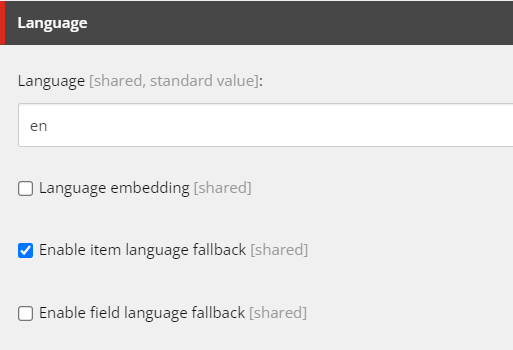
When requesting an item in a specific language, and the language version for that item or route is not found, XM Cloud (Experience Edge) will not resolve the item and return null or 404. You can configure XM Cloud to “fallback” to a default language when a requested language version is not found on for an item.
Always use the site settings to configure language fallback in XM Cloud.
Set the "Enable item language fallback" field on the Site Grouping item, locally in /sitecore/content/$tenant/$site/Settings/Site Grouping/$siteGrouping
Dictionary Phrases
Dictionary phrases are configured under the site (or in an shared site) at /sitecore/content/$tenantOrSiteCollection/$site/Dictionary.
To use a dictionary phrase in your head application, use the useI18n hook provided by the next-localization package.
import { useI18n } from 'next-localization'; const MultilingualComponent = (): JSX.Element => { const { t, locale } = useI18n(); return ( <div> <p>Translated text: {t('dictionary-phrase')}</p> <p>The current language is: {locale()}</p> </div> ); }; export default MultilingualComponent;
The dictionary-factory-service in the foundation head repository will provide access to all dictionary phrases for a site. You can also directly query for dictionary phrases using the following GraphQL query:
query DictionarySearch($rootItemId: String!, $language: String!, $templates: String!, $pageSize: Int = 10, $after: String) { search(where: { AND: [{ name: "_path", value: $rootItemId, operator: CONTAINS }, { name: "_language", value: $language }, { name: "_templates", value: $templates, operator: CONTAINS }] }, first: $pageSize, after: $after) { total pageInfo { endCursor hasNext } results { key: field(name: "Key") { value } phrase: field(name: "Phrase") { value } } } }
ASP.NET Core SDK does not support simple dictionary phrases translation similarly to Next.JS implementation yet. The feature is in the backlog and should be implemented in the future.
There is however dictionary service implementation that can be used as a workaround. It still requires some additional implementation to make dictionary service usage more efficient. Currently it is possible to only fetch the whole dictionary for a website. It is surely make sanse to implement this as a service independently of any component and cache dictionary values (with proper invalidation strategy).
To use dictionary service, register it in Program.cs file:
builder.Services.AddSitecoreRenderingEngine(options =>
{
options.AddStarterKitViews()
.AddViewComponent("DictionarySample-Component", "DictionarySample")
.AddDefaultPartialView("_ComponentNotFound");
})
.ForwardHeaders()
.WithSitecorePages(sitecoreSettings.EdgeContextId ?? string.Empty, options => { options.EditingSecret = sitecoreSettings.EditingSecret; });
builder.Services.AddSingleton<IDictionaryService, DictionaryService>();
WebApplication app = builder.Build();Below is an example of simple dictionary service usage from a component.
Note the example is not a best practice, since it fetches the whole dictionary in View Component at every rendering.
using GraphQL.Client.Abstractions;
using Microsoft.AspNetCore.Mvc;
using Sitecore.AspNetCore.SDK.Pages.Services;
namespace Sitecore.AspNetCore.Starter.ViewComponents
{
public class DictionarySampleViewComponent : ViewComponent
{
private readonly IDictionaryService _dictionaryService;
private readonly IGraphQLClient _graphQLClient;
public DictionarySampleViewComponent(IDictionaryService dictionaryService, IGraphQLClient graphQLClient)
{
_dictionaryService = dictionaryService ?? throw new ArgumentNullException(nameof(dictionaryService));
_graphQLClient = graphQLClient ?? throw new ArgumentNullException(nameof(graphQLClient));
}
public async Task<IViewComponentResult> InvokeAsync()
{
var scContext = HttpContext.GetSitecoreRenderingContext();
// Ensure scContext and its nested properties are not null before accessing them
if (scContext?.Response?.Content?.Sitecore?.Context == null)
{
return View("DictionarySample", "Error: Sitecore context is not available.");
}
// Getting Site name and Language from the Sitecore context - we need it to get values from dictionary
var language = scContext.Response.Content.Sitecore.Context.Language;
var siteName = scContext.Response.Content.Sitecore.Context.Site?.Name ?? "defaultSite"; // Fallback to a default site name if null
// Get the entire dictionary for the site and language.
// NOTE: not a good practice to fetch entire dictionary every time within the single component invocation.
// Consider caching or fetching only the required keys for performance optimization. Wait for the feature to be implemented for Sitecore ASP.NET Core SDL
// or create to fetch and cache dictionary items as needed (don't forget about cache invalidation).
var dictionary = await _dictionaryService.GetSiteDictionary(siteName, language, _graphQLClient);
// Lookup the translation for the given key using LINQ
var translation = dictionary.FirstOrDefault(item => item.Key == "HelloWorld")?.Value
?? "[Key not found: 'HelloWorld']";
return View("DictionarySample", translation);
}
}
}🚀 Coming soon.