Context
Automated tests ensure your decision models behave predictably and catch regressions before they reach production. This recipe guides you through validating model logic programmatically, making tests repeatable across environments, and integrating checks into your deployment pipeline.
The provided code is intended as a guideline and must be tailored to suit your specific implementation requirements. Please ensure thorough end-to-end testing is conducted to validate its functionality and performance in your environment.
Execution
Before you begin, ensure the following entities are already created and available for testing:
- A decision model
- At least one decision model variant
- Decision table
- Programmables
- Offers
Familiarize yourself with:
- Sitecore Personalize APIs
- OAuth authentication
- Writing automated tests (language-agnostic)
Sitecore Personalize REST APIs require OAuth Bearer Token authentication. All requests must be sent over HTTPS.
Decision model testing
When Sitecore Personalize calls a decision model, it can potentially execute any decision model variants that are in a state of production. For example, you might use a decision model to determine the next best offer to display on your organization's retail site.
A decision model can contain one or more variants in state of production such as the following.
Decision Model Variant A
This decision model variant uses the guest type and number of orders as input to determine the next best offer. The guest type can be one of the following:
- Customer: A customer is a guest that has provided enough identity information according to your organization's identity rules.
- Visitor: A visitor is a guest who has not provided enough identity information or has provided partial identity information but not enough to meet the organization's identity rules.
Decision Model Variant B
The second decision model variant uses the guest type, number of orders, and propensity score as input to determine the next best offer.
Using this same example, when you write your tests, you must include the various input that supports each type of use case. For example, you'll need to test that each decision model variant returns the intended offer depending on the guest type, but also taking into account the number of orders. To test Decision Model Variant B, you'll also need to take into account different propensity scores or the absence of a propensity score.
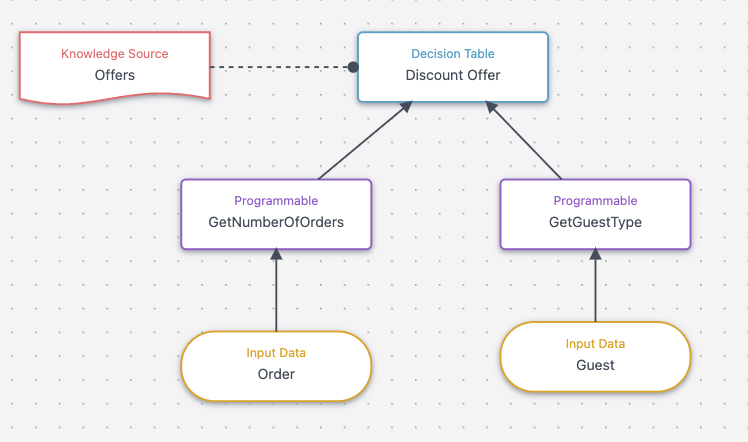
The following example describes Decision Model Variant A that outputs the next best offer based on guest type and number of orders. The decision model contains and uses the following entities:
- Guest context as an input parameter
- A knowledge source that contains offers
- Two programmables:
- Programmable A evaluates the guest type
- Programmable B evaluates the number of orders
- A decision table that uses the output of both programmables as input to determine the best offer. The decision table contains the following business logic:
| Guest Type | Number of Orders | Offer |
|---|---|---|
| Customer | 1 | 10% Offer |
| Customer | >1 | Gold Member 20% Offer |
| Visitor | Any | Sign up 5% Offer |
Implementation Approach
The following steps walk through the steps to test a decision model.
1.Authenticate with Sitecore Personalize using the OAuth token endpoint
curl --location --request POST 'https://{{host}}/v2/oauth/token' \

--header 'Authorization: Basic encodedUserAndAPIToken' \

--header 'Content-Type: application/x-www-form-urlencoded' \

--data-urlencode 'grant_type=client_credentials'
Example response:
{

  "access_token": "eyJra.ey19.bgdakiSfrQLeiqdA",

  "x_access_token": "eyJra.eyJj.jX74OKA",

  "expires_in": 600,

  "token_type": "bearer"

}
Use the token returned in the response in the subsequent requests to the Sitecore Personalize APIs, for example:
curl --location --request GET 'https://{host}/v3/offers' \

--header 'Authorization: Bearer eyJra...qdA'
2. Send a request to test a decision model
Use a POST request in the the following format to test a decision model:
POST 'https://{host}}/v2/testDecisionModel'
The following contains definitions of the attributes in the test decision model request.
- context - JSON array of JSON objects. This contains input data provided by an internal service known as the guest context service.
"context": {
 "channel": "",
 "guest": {
   "email": "john.doe@gmail.com",
   "emails": [
     "john.doe@gmail.com"
   ][ "john.doe@gmail.com" ],
   "ref": "f9945b76-741c-4178-89c4-ade383df24c9",
   "sessions": [],
   "orders": [],
   "segmentMemberships": []
 }
}-
decisionModelRef - string The reference of the decision model that you want to test, example
"f59dae47-d7ae-4762-90e8-c5e17ac4ffa7" -
decisionModelVariantRef - string The reference of the decision model variant that you want to test, example
"8ad207c8-b2ae-4b30-809a-caa442c3cc3d"
curl --location --request POST 'https://{host}/v2/testDecisionModel' \
--header 'Authorization: Bearer eyJraW...ryg' \
--header 'Content-Type: application/json' \
--data-raw '{
  "decisionModelRef": "f59dae47-d7ae-4762-90e8-c5e17ac4ffa7",
  "decisionModelVariantRef": "8ad207c8-b2ae-4b30-809a-caa442c3cc3d",
  "context": {
    "channel": "",
    "guest": {
      "email": "john.doe@gmail.com",
      "emails": [
        "john.doe@gmail.com"
      ],
      "ref": "f9945b76-741c-4178-89c4-ade383df24c9",
      "sessions": [],
      "orders": [],
      "segmentMemberships": []
    }
  }
}'
3. Review the decision model test response
Analyze the response returned by the testDecisionModel API to determine the result of the test.
The following table contains definitions of the attributes in the test decision model response.
| Attribute | Type | Description | Example |
|---|---|---|---|
| response.error | true/false | General error boolean flag that returns true if an error occurs running the decision model. | false |
| response.errorCause | string | Attribute is returned if an error occurs. | TypeError: null has no such function "toUpperCase" |
| response.decisionModelResultNodes | JSON array of JSON objects | Contains the result of each decision model variant node. | N/A |
| response.decisionModelResultNodes.id | string | [system generated uuid for the element, that’s necessary for asserting] | "d4cd9ae8-4219-4728-ac0a-3e9683820a3f" |
| response.decisionModelResultNodes.name | string | Name of the decision model variant node. | "Offer Recommender" |
| response.decisionModelResultNodes.error | boolean | A boolean flag to indicate the presence of an error. | true |
| response.decisionModelResultNodes.executionTime | number | The decision model response time in milliseconds. | 59.278372 |
| response.decisionModelResultNodes.type | string | The type of decision model entity. | "programmable" |
| response.decisionModelResultNodes.outputs | A JSON array of JSON objects | Output element from the node. We will use that to assert our expected results. | [ { "businessClassSearch":false } ] |
The following example shows a cURL response for testing a decision model:
{
    "decisionModelName": "Auto test example",
    "decisionModelRef": "59965fbe-96b2-4a50-95d1-00437e403cd3",
    "decisionModelVariantName": "discount offer",
    "decisionModelVariantRef": "4c6b9097-a7c8-49a9-9b66-2d3be851889a",
    "decisionModelVariantRevision": 1,
    "error": false,
    "debug": {
        "bucket": "0",
        "logs": ""
    },
    "decisionModelResultNodes": [
        {
            "id": "b506c231-d977-49bd-ba06-5a03ce2009b5",
            "name": "GetGuestType ",
            "error": false,
            "type": "programmable",
            "executionTime": 57.993728,
            "dependentNodeIds": [],
            "outputs": [
                {
                    "guestType": "CUSTOMER"
                }
            ]
        },
        {
            "id": "c611499b-31b4-4d6d-9ede-3c5a5b81a97b",
            "name": "GetNumberOfOrders",
            "error": false,
            "type": "programmable",
            "executionTime": 121.378768,
            "dependentNodeIds": [],
            "outputs": [
                {
                    "numberOfOrders": 2
                }
            ]
        },
        {
            "id": "d7139252-21f0-43f8-85d8-0dec182cf5ed",
            "name": "Discount Offer",
            "error": false,
            "type": "decisionTable",
            "executionTime": 0.477328,
            "dependentNodeIds": [
                "b506c231-d977-49bd-ba06-5a03ce2009b5",
                "c611499b-31b4-4d6d-9ede-3c5a5b81a97b"
            ],
            "outputs": [
                {
                    "ruleId": "DiscountOffer_1",
                    "offer": {
                        "type": "com.retailsite.offer",
                        "value": "919d8cda-0f27-4795-b8cf-29a94d6cbb45"
                    }
                }
            ]
        }
    ]
}
Insights
Sitecore Personalize provides several APIs that allow to retrieve data from the various decision model entities using a GET request.
- Use the Decision Model REST API to perform a retrieve decision model definitions function to retrieve the reference number of a decision model. The following is an example of a cURL request:
curl --location --request GET 'https://{host}/v2/decisionModelDefinitions' \
--header 'Authorization: Bearer eyJraWQ..qdA'
- Use the Decision Model Variant REST API to perform the retrieve decision model variant reference function to return a decision model variant reference. To do this, you must have the decisionModelVariantRef attribute returned when retrieving the decision model variant reference. The following is an example of a cURL request:
curl --location --request GET 'https://{host}/v2/decisionModelDefinitions/{uuid}/variants' \
--header 'Authorization: Bearer eyJraWQ..qdA'
- Use the Connections REST API to perform the retrieve connections function to return a list of available connections. The following is an example of a cURL request:
curl --location --request GET 'https://{host}/v2/connections' \
--header 'Authorization: Bearer eyJraWQ..qdA'