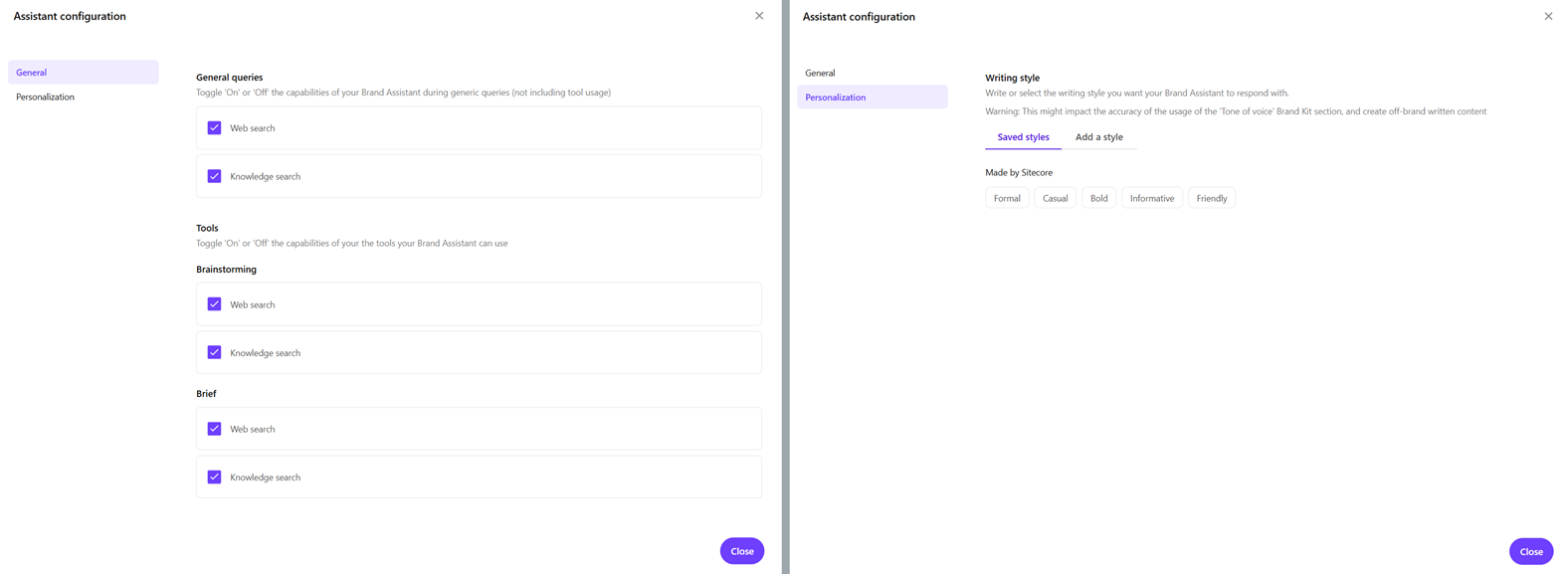
We're excited to announce powerful new configuration options for the Brand Assistant in SitecoreAI and Content Hub. This new feature gives your team greater control over how content is generated and helps ensure every response aligns with your brand's unique voice and information requirements.
You can access the Assistant configuration dialog directly from the Tool configuration icon in the chat interface. From there, you can configure two key aspects of the Brand Assistant's behavior. These settings apply across all chats until changed.
Writing style configuration
You can choose how the Brand Assistant generates responses by selecting from five predefined writing styles: Formal, Casual, Bold, Informative, or Friendly, or by creating custom styles tailored to their needs.
You can change the style at any time to immediately adjust how responses are generated for different chats, audiences, or contexts. This is separate from the brand kit’s tone of voice, which is centrally defined and provides consistent, organization-wide guidance.
Information source configuration
You can choose whether the Brand Assistant uses knowledge sources, web search, or both for general chats, brainstorming, and brief generation modes.
This flexibility ensures responses are grounded in the most relevant and up-to-date information for each use case.